Artificial Intelligence (AI) has changed how we present ourselves in the digital world. From personalized recommendations to chatbots and content creation, AI is everywhere. One of the most exciting applications is the ability to create an AI avatar of yourself—a digital version of you that can talk, move, and even represent you online.
Whether you’re a content creator, business professional, or someone curious about the future of digital identity, AI avatars make it possible to replicate your appearance and personality in a matter of minutes. In this guide, we’ll explain step-by-step how to create your own AI avatar quickly, the tools you can use, and the ways you can leverage it across different platforms.
What Is an AI Avatar of Yourself?
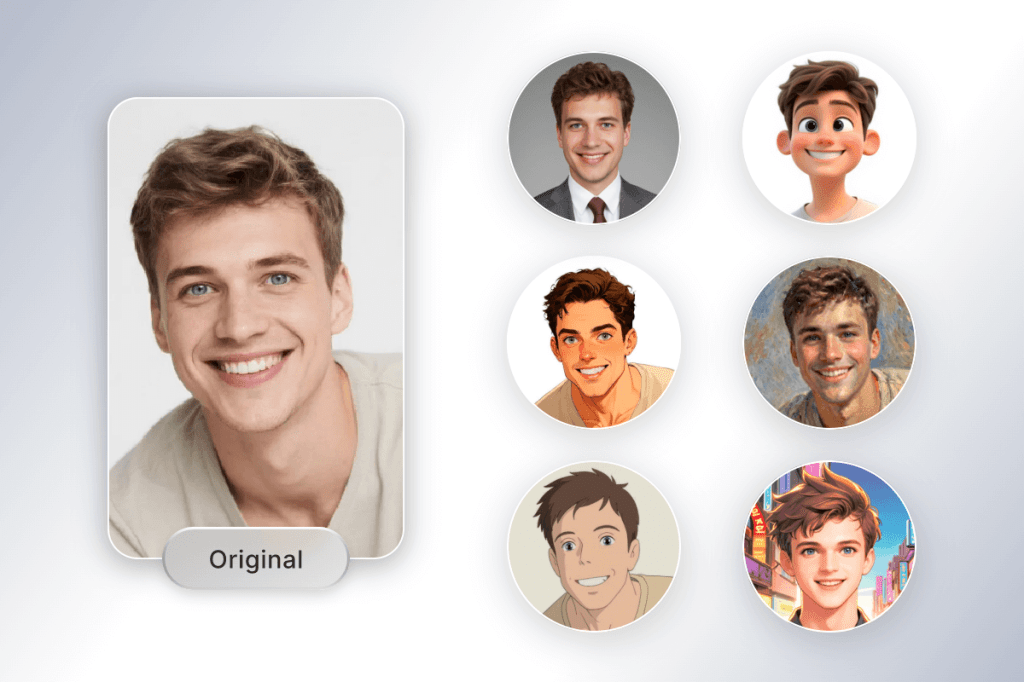
An AI avatar of yourself is a digital replica designed using artificial intelligence. Unlike traditional profile pictures or animated icons, AI avatars can be lifelike, expressive, and interactive. They can mirror your face, voice, and mannerisms to create a more realistic online presence.
With the help of advanced machine learning, computer vision, and text-to-speech technology, an AI avatar can be used for videos, presentations, virtual events, customer service, and even social media.
Why Create an AI Avatar of Yourself?
Before we dive into the “how,” let’s talk about the “why.” Here are some reasons people are turning selfies into smart, digital avatars:
- Personal Branding: Stand out on social media and websites with a unique identity.
- Content Creation: Save time and money by letting your avatar speak on your behalf in videos.
- Business Communication: Use avatars for professional presentations or virtual assistance.
- Privacy & Comfort: Stay off-camera while still maintaining a visual presence.
- Entertainment & Metaverse: Bring a digital twin of yourself into virtual worlds and games.
Step-by-Step: How to Create an AI Avatar of Yourself
Creating an AI avatar doesn’t require advanced technical knowledge anymore. Thanks to modern AI tools, you can get started in just a few steps:
1. Choose the Right AI Avatar Generator
Start by selecting a platform that matches your goals. Some popular AI avatar generators include:
- Tagshop AI Avatar – Easy-to-use, customizable avatars for business and creators.
- Ready Player Me – Ideal for gaming and metaverse experiences.
- Synthesia – Great for creating talking avatars for professional videos.
- Replika – For creating interactive, conversational avatars.
Look for features like customization, voice options, ease of use, and pricing plans.
2. Upload Your Photo or Video
Most AI avatar platforms allow you to upload a selfie or short video. The AI analyzes your facial structure and expressions to create a digital copy. For best results:
- Use a clear, well-lit photo.
- Avoid heavy filters or shadows.
- Look straight into the camera for accuracy.
3. Customize Your Avatar
Once the basic version is generated, you can personalize your avatar:
- Facial features – Adjust eyes, hair, skin tone, or facial structure.
- Clothing & accessories – Match your style or experiment with a different look.
- Backgrounds – Add plain colors, virtual environments, or branded settings.
4. Add Voice and Expressions
AI avatars aren’t just about looks—they can also talk and move. You can:
- Use built-in AI-generated voices.
- Upload your own voice to clone it.
- Choose from multiple languages and accents.
Some platforms also let you select emotions (happy, professional, neutral) so your avatar matches the tone of your message.
5. Export and Use Your Avatar
Once your AI avatar is ready, export it in video, image, or GIF format. You can now use it for:
- YouTube videos.
- TikTok or Instagram reels.
- Business presentations.
- Customer service bots.
- Metaverse platforms or games.
Tips for the Best Results
- Start simple: Use free versions before upgrading to premium plans.
- Stay authentic: Customize your avatar to resemble you but keep it professional if it’s for business.
- Experiment: Try different styles, voices, and expressions to see what works best.
- Keep updating: Refresh your avatar occasionally to match your evolving brand or personality.

Where Can You Use an AI Avatar of Yourself?
The possibilities are endless. Here are a few practical ways people are using AI avatars today:
- Social Media Marketing – Share engaging video content without being on camera.
- YouTube Hosting – Let your avatar be the face of your channel.
- Corporate Training – Use avatars as trainers in e-learning modules.
- Customer Engagement – Replace chatbots with human-like avatars.
- Gaming & Virtual Worlds – Represent yourself in the metaverse.
Read More : AI Avatars VS Chatbots
Benefits of Using an AI Avatar
- Saves time: Create content faster without long video shoots.
- Cost-effective: Avoid hiring actors or video editors.
- Global reach: Multilingual avatars connect with international audiences.
- Creative freedom: Experiment with different looks, voices, and settings.
The Future of AI Avatars
As technology evolves, AI avatars will only get more realistic and versatile. In the near future, we can expect avatars that not only look like us but also understand our emotions, speak multiple languages fluently, and adapt in real-time.
This means your AI avatar could act as a 24/7 digital representative, interacting with clients, creating content, or engaging audiences while you focus on other tasks.
Final Thoughts
Creating an AI avatar of yourself is no longer a complex task. With just a photo and the right tool, you can design a lifelike digital version of yourself in minutes. Whether you want to build a stronger online presence, save time on content creation, or simply explore the future of digital identity, AI avatars open up endless opportunities.
If you’re ready to get started, try out platforms like Tagshop’s AI Avatar Generator and experience how simple, fast, and fun it is to bring your digital twin to life. The future of self-expression is here—and it starts with your AI avatar.
 AI Avatar Photo Blog
Leave a comment